

Control4 needs a stable, well-designed home network because almost everything it does travels over it. Control4 requires an Ethernet connection to set up a controller and recommends Ethernet over Wi-Fi afterwards. The app, touchscreens, cameras, streaming music and remote access all share that network, so a weak one shows up as a slow, unreliable smart home.
When a smart home feels slow or unreliable, the network is one of the first things worth checking. This guide explains what Control4 asks of your network, and what a network needs so it never becomes the weak link.
What does Control4 use the network for?
More than most people realise. On a typical system the network carries:
- Control of TVs, AV receivers, streaming boxes such as Apple TV, and other network-connected devices, which the controller operates by IP control (Control4 CORE 3 guide)
- The Control4 app on your phones and tablets
- Touchscreens: in-wall T4 touchscreens connect by Ethernet or Wi-Fi, tabletop models by Wi-Fi only (Control4 T4 data sheet)
- Streaming music from online services, and camera and door entry video
- Remote access, notifications, voice assistants and software updates, which reach your system over the internet through Control4 Connect (Control4 services)
Some things do not use your Wi-Fi at all. Control4 controllers also have Zigbee and Z-Wave radios, which are separate low-power wireless meshes for lights, thermostats and locks (Control4 CORE 3 guide). They still depend on the controller, and the controller depends on the network.
What are Control4’s own network requirements?
Control4’s installation guide for the CORE 3 controller is clear on the essentials (Control4 CORE 3 guide):
- The home network should be in place before the controller is installed.
- An Ethernet connection to the local network is required for setup.
- The controller requires a network connection to use all of its features.
- After setup, Ethernet is recommended over Wi-Fi for the best connectivity (on the CORE 3, Wi-Fi uses an optional USB adapter).
For Wi-Fi touchscreens, Control4 asks that each location has a strong Wi-Fi signal and is on the same network as the controller (Control4 T4 data sheet). In other words: wire what you can, and make the Wi-Fi strong everywhere else.
What are Araknis and OvrC?
Araknis Networks is the professional networking brand that sits alongside Control4. ADI lists Control4, OvrC and Araknis Networks together among its exclusive brands (ADI). The Araknis range covers routers, switches with up to 10G switching, and access points including Wi-Fi 7 models (Araknis).
OvrC is the cloud platform that lets an integrator monitor and manage those networks remotely. Araknis says it can show network health, speed tests, device uptime and latency, reboot individual PoE ports or whole switches, reset access point radios and push Wi-Fi settings across all access points at once (Araknis OvrC). PoE, or Power over Ethernet, means a single network cable carries both data and power to a device such as a touchscreen or access point. Control4 controllers can be added to OvrC too, with no port forwarding needed (Control4 CORE 3 guide).
In practice, remote management means many faults can be spotted and fixed without a visit. Araknis product pages are written for all markets, and we could not confirm UK availability of every model, so we confirm the specific kit when we design your network. Araknis is not the only option: in our Thames Ditton garden room, for example, we ran a dedicated fibre line more than 70 metres from the house to feed a Ubiquiti network that delivers Wi-Fi throughout the building.
What makes a home network good enough for Control4?
There is no single product that makes a network reliable. It is the design. This is what we look for in a Control4-ready network:
- Cable first. A wired connection to the controller, the equipment rack, every TV position and every in-wall touchscreen.
- Wired access points. Ceiling-mounted access points connected by cable, placed for the rooms you actually use, including the garden and outbuildings.
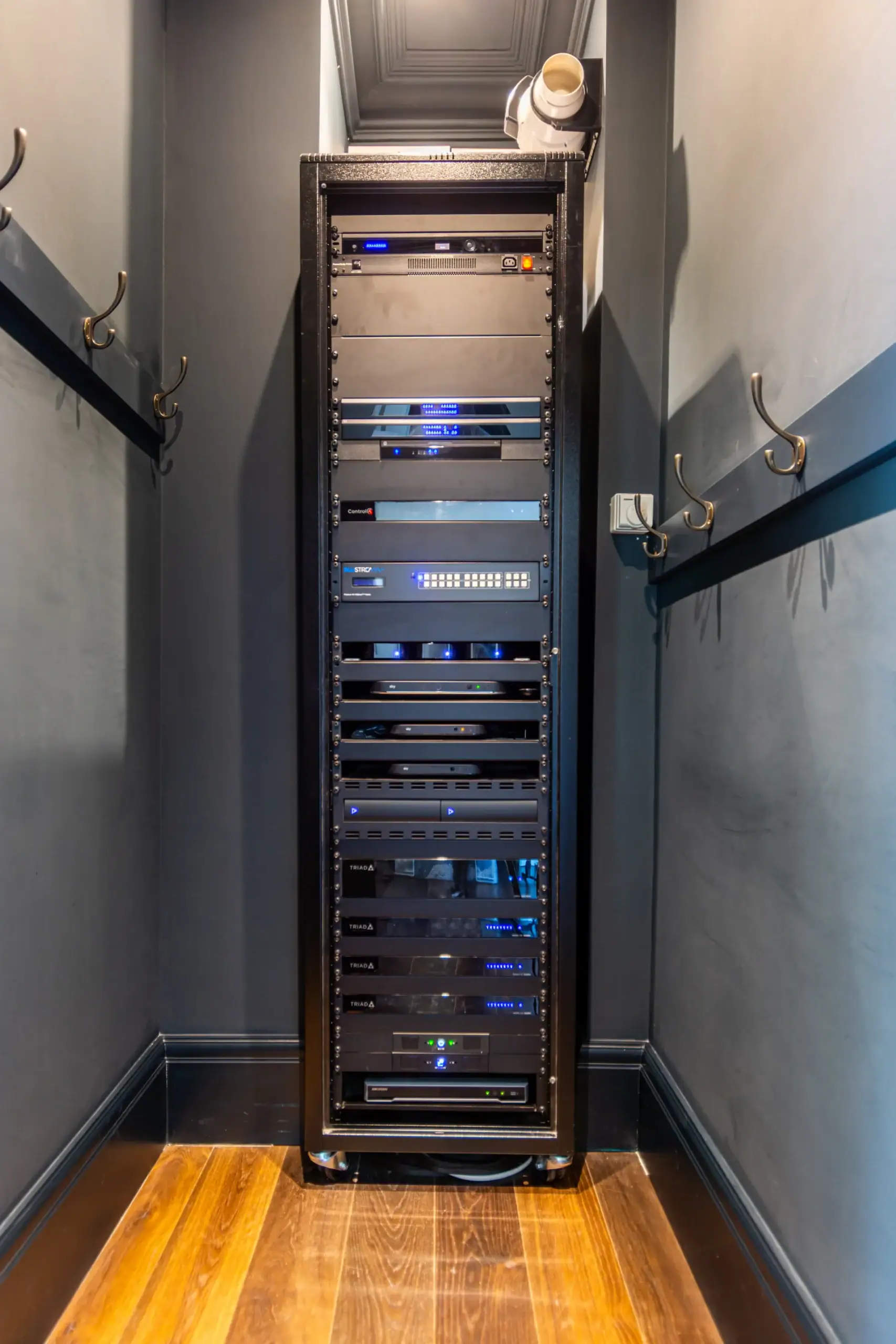
- A proper rack. Router, switches and AV equipment in one ventilated, labelled rack rather than scattered behind furniture.
- Separate networks where they help, such as a guest Wi-Fi network kept apart from the devices that run your home.
- Remote monitoring, so problems are caught before you notice them.
- Documentation, so whoever supports the system in future knows exactly what is there.

Should the network be done before Control4 is installed?
Yes. Control4 itself says the network should be installed before the controller (Control4 CORE 3 guide). On a new build or renovation, that means planning cable routes at drawing stage, when they are cheap on paper rather than expensive after plastering. On an existing home, it often means improving Wi-Fi coverage and replacing the broadband provider’s router as the heart of the network.
It is also why the network belongs in any takeover or upgrade. Our guide to upgrading an older Control4 system covers the rest of that process, and what Control4 is and how it works explains the platform from the start.
Network upgrades are a regular part of our work. As one Google review put it: “We recently worked with Adam and the Art of Integration team to upgrade the WiFi and Sonos system in our home in Chobham.” (Daniel Eld) Our data and Wi-Fi networks service covers exactly this work, and our Control4 smart home installation page explains how the network fits into a full system.
If your smart home is slower or less reliable than it should be, the network is a good place to start. Book a free design consultation.
Frequently asked questions
Can a Control4 controller run on Wi-Fi?
Yes, after setup, but Control4 requires Ethernet for setup and recommends Ethernet over Wi-Fi for the best connectivity.
Do I need Araknis networking for Control4?
No. Control4’s installation guide asks for a working Ethernet network rather than a particular brand, although Araknis and OvrC belong to the same company as Control4, and Control4 controllers can be added to OvrC.
Does Control4 need an internet connection?
Only for some features. Control4 says its systems work locally without a subscription, but remote access, voice assistants, notifications and software updates need the internet and Control4 Connect.
Will my broadband provider’s router be good enough?
It can connect a small system, but we rarely recommend relying on it for a whole home, because a Control4 house needs wired connections, strong Wi-Fi in every room and remote monitoring that a basic provider router is not built to manage.
What is OvrC?
OvrC is a cloud platform for integrators that monitors and manages Araknis routers, switches and access points, and can include Control4 controllers, so many network faults can be diagnosed and fixed remotely.